Taplio Review (2026): Honest Pros, Cons, Pricing, and When It's Worth It
An honest, hands-on Taplio review. What it does well, where it falls short, current pricing, and who should (and shouldn't) be using it in 2026.
There are so many LinkedIn Content creation tools. We wanted to review Taplio to see how it fared on the list.
This Taplio review is based on hands-on experience with the tool. Yes, we actually bought a subscription and tried it out ourselves. So this isn't just a surface-level feature list, just an honest breakdown of what works, what doesn't, and whether it's the right fit depending on your use case.
And the best way to save yourself time and money is to understand what you're buying before you buy it. So here's insight into Taplio and how it works.
Let's get into it.
Looking for a side-by-side comparison? Read our full Taplio vs Kleo breakdown.
Key Takeaways
- Taplio is a solid LinkedIn content creation tool.
- Taplio is best for Solo founders, SDRs, and early-stage creators who want a reliable scheduling and inspiration engine built specifically for LinkedIn.
- What Taplio does best: If your main challenge is staying consistent and you want a clean, simple workflow for queuing up posts, Taplio delivers.
- Where it struggles: Taplio struggles with personalization. The content generation is powered by ChatGPT, and while it's useful for getting a first draft or breaking through a creative block, the output can tend to feel generic.
- Who should use it: Especially useful if lead generation and outreach features matter to you.
- Who shouldn't: Creators who've moved past the "I need ideas" phase and are now focused on building a distinct voice and personal brand on LinkedIn will want to look into other tools.
- How it fits into a broader system: Taplio works well as a scheduling and distribution layer. But if you're looking for a tool that learns your writing style, captures your knowledge, and actually thinks alongside you as a content partner, you'll eventually outgrow it. That's where tools like Kleo start to make more sense.
Taplio at a Glance
We scored Taplio across six categories based on our hands-on experience.
Overall: 3.9 / 5
Taplio is a well-built LinkedIn tool that does scheduling and content inspiration really well. Where it falls short is AI personalization. The content it generates doesn't learn your voice, and that gap becomes more noticeable the longer you use it.
Quick Verdict: Is Taplio Worth It in 2026?
Let's cut to it. Here's where Taplio delivers and where it doesn't.
Taplio is a great tool for LinkedIn scheduling
You want to build a consistent LinkedIn posting habit, and you need a simple tool that handles scheduling, gives you content ideas when you're stuck, and tracks how your posts perform. Taplio excels here.
The biggest limitation
Taplio doesn't learn your voice and uses ChatGPT under the hood, which means the content it generates is functional but not necessarily personalized. You can adjust tone settings manually, but the tool doesn't study your past posts, analyze your writing patterns, or adapt to how you naturally communicate. Every session starts from a similar baseline.
If you're already consistent and your focus has shifted to really scaling your personal brand on LinkedIn, Taplio won't necessarily solve that problem.
When it's worth the money
If you're posting on LinkedIn regularly (or want to be), and your main bottleneck is consistency and workflow, Taplio at the Growth plan ($69/month) gives you solid value. You get AI credits, scheduling, the Chrome extension, engagement tools, and analytics in one place.
What Is Taplio?
Taplio is an AI-powered LinkedIn content creation tool that combines content creation, post scheduling, analytics, and engagement features in one dashboard. It's built exclusively for LinkedIn.
The tool is owned by lempire, the same company behind Lemlist (one of the bigger cold outreach platforms on the market).
What problem it solves?
Most people know they should be posting on LinkedIn. The problem is everything that comes after that thought. Coming up with ideas and writing something that doesn't sound like a robot, scheduling it, doing it again tomorrow. And the day after that.
Taplio tries to compress that whole process into a single workflow. Open the app, find an idea, write (or generate) a post, schedule it, and move on with your day.
That's the promise.
Taplio Features Breakdown
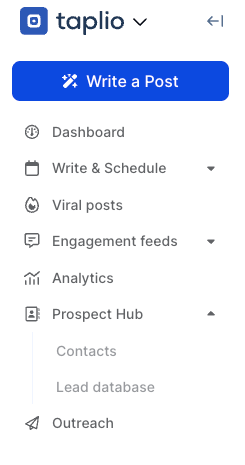
The Taplio dashboard is easy to navigate with features highlighted on the left hand side via an easy drop down. Features include a writer and scheduler, viral post finder, engagement feed, analytics and prospect hub.
We reviewed some of the top features on Taplio.
Content creation
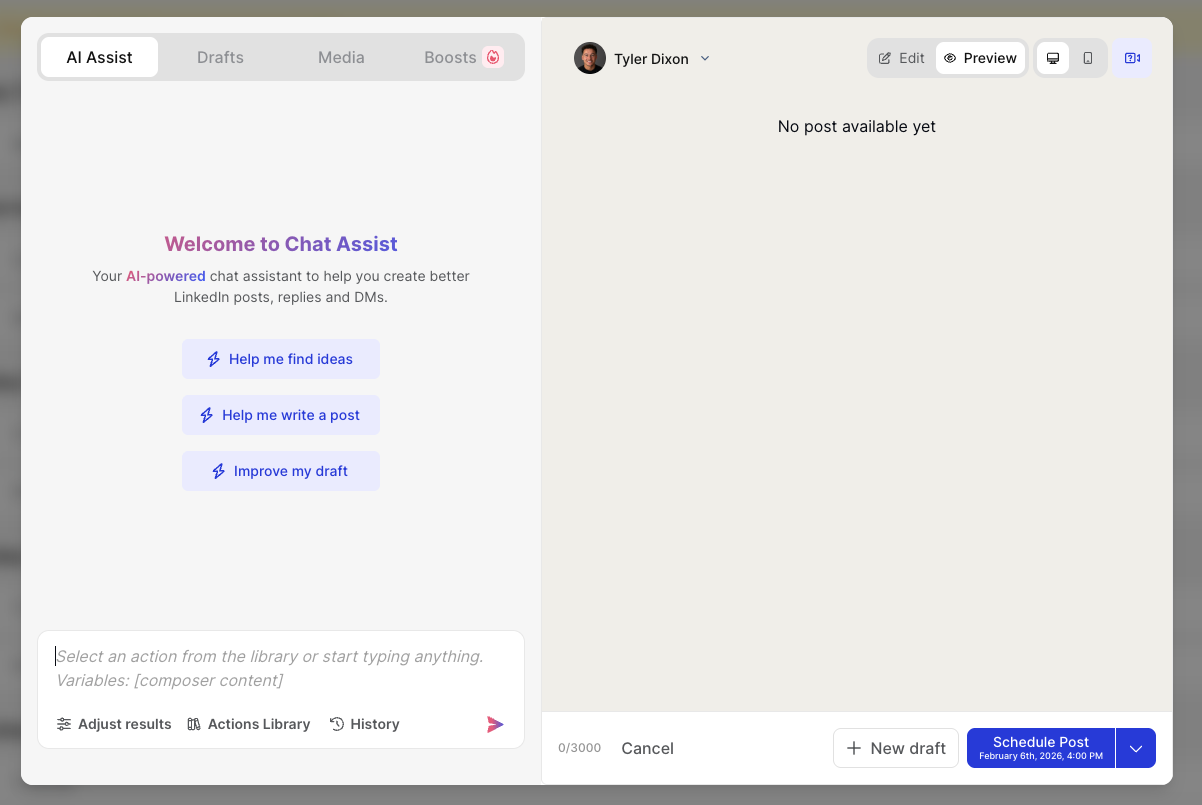
The platform gives you access to a massive library of over 5 million viral LinkedIn posts. You can filter by niche, industry, and content format. You can use the "Help me find ideas” to help you get started.
Scheduling and consistency
Taplio's scheduler is clean and intuitive. Once you've written your post, you simply schedule based on a date scheduler. You can view your schedule in a daily, weekly, or monthly format. It also supports URL previews, scheduled comments on your own posts (a smart reach-boosting tactic), auto-replies, and auto-DMs to people who engage with your content.
On the pro plan, there's also a re-queue feature that recycles your best-performing posts back into the rotation, and a shuffle option if you want to mix things up.
Analytics and performance feedback
Taplio's analytics go beyond what LinkedIn offers natively. You get a clear dashboard showing follower growth, post performance by various metrics, and the ability to track which content types generate the most engagement.
There's also a monthly stats email, which is a nice touch for staying on top of trends without logging in constantly.
Prospect Hub feature
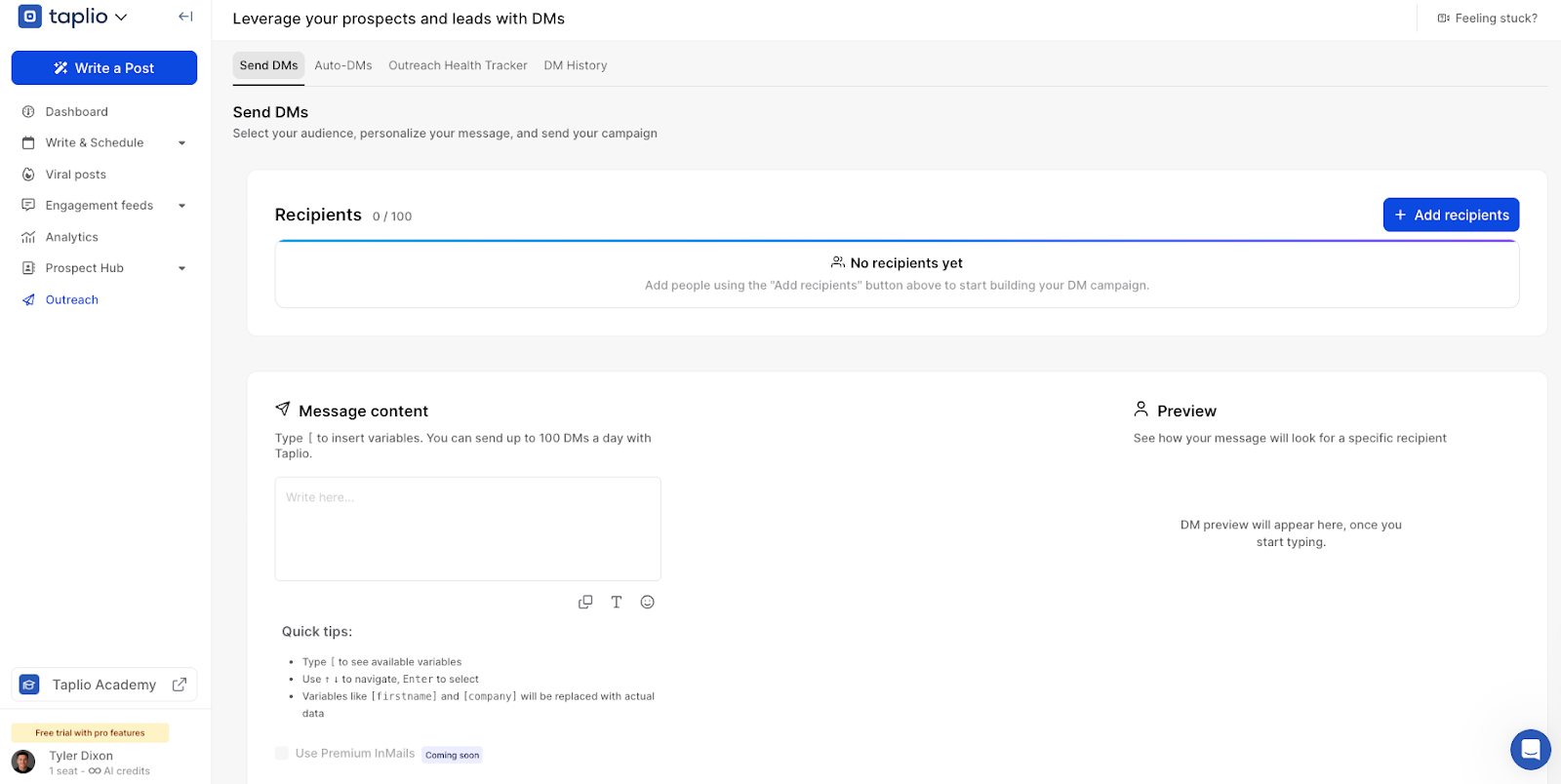
The outreach and DM feature is a great addition, allowing you to both automate DM's based on post comments and send DM's directly.
Taplio Chrome extension
The Taplio X Chrome extension is free and works even without a paid subscription. Once installed, it overlays insights directly onto your LinkedIn feed.
You can see top-performing posts from any creator's profile, view your own analytics at a glance, save posts to your collections, and get smart reply suggestions when commenting.
The extension is genuinely useful for staying in "creator mode" while you browse LinkedIn. It turns passive scrolling into active research. The Chrome extension is rated 4.3 out of 5 in the Chrome Web Store.
Taplio Pricing: What Do You Really Pay For?
Current pricing tiers
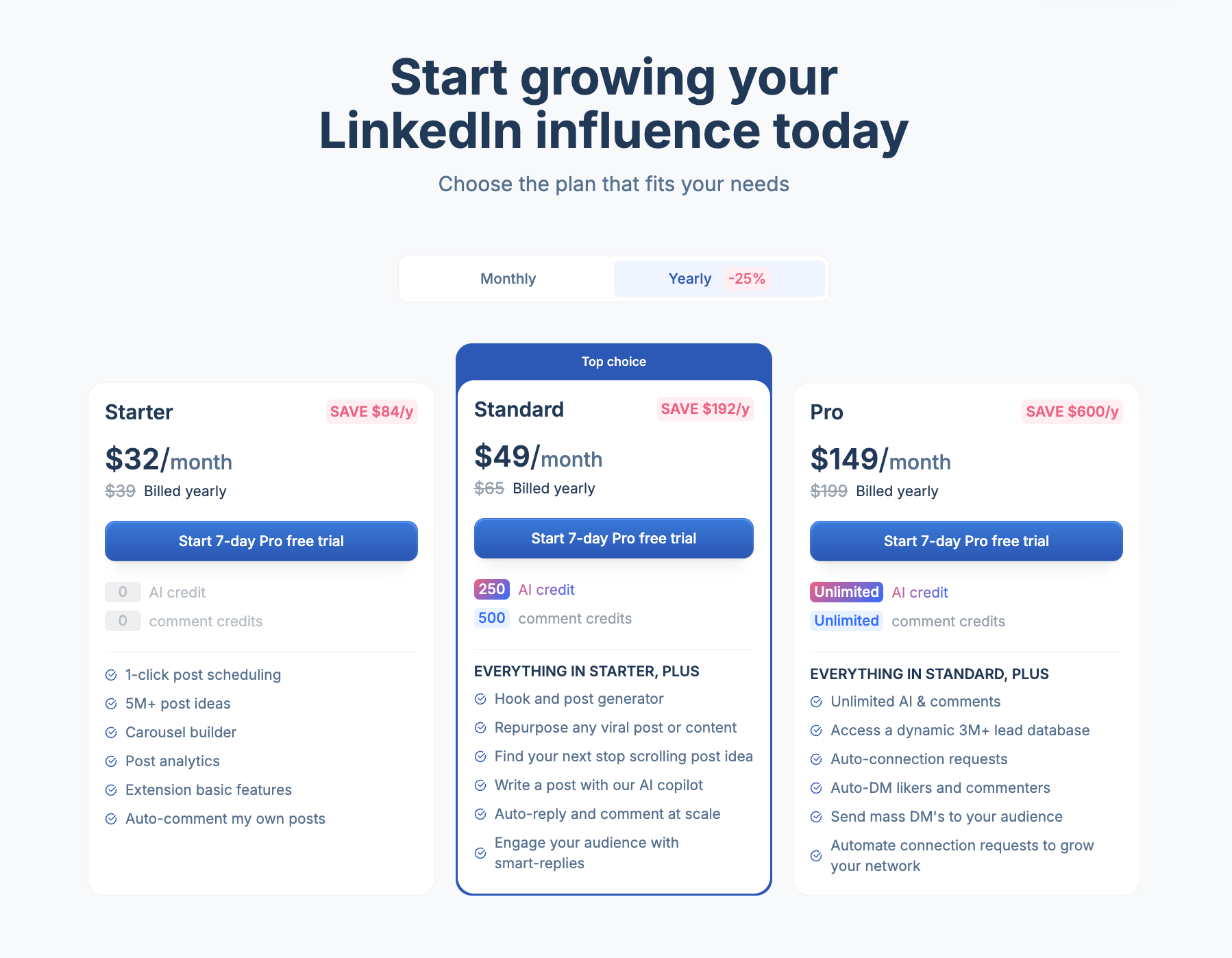
Taplio offers three plans, all billed monthly with a 25% discount available on annual billing. Every plan comes with a 7-day free trial that gives you access to Pro-level features, then reverts to your chosen plan after the trial ends.
Value vs effort required
Pricing in Taplio can be expensive.
The Starter plan at $39/month gives you zero AI credits and zero comment credits. That means no AI-generated posts, no carousel generation, no AI-assisted writing. You're essentially paying $39 for a scheduler, the viral post library, and basic Chrome extension features.
For most people, the real value starts at the Growth plan ($69/month). That's where you get AI writing, carousel creation, engagement automation, and analytics. But the 250 AI credit limit means you need to be thoughtful about how you use them. Each post generation, carousel build, or draft improvement consumes credits.
The Pro plan at $199/month unlocks unlimited AI, the lead database, and outreach automation. It's built for people who treat LinkedIn as a primary sales channel, not just a content platform.
The bottom line on pricing
Taplio isn't cheap. At $69/month for the features most creators actually need, you're spending $828 per year. That investment makes sense if you're consistently using the tool to post, engage, and track performance. But if you find yourself mostly using it as a scheduler, there are more cost-effective options.
Pros and Cons of Taplio
What do people say about Taplio?
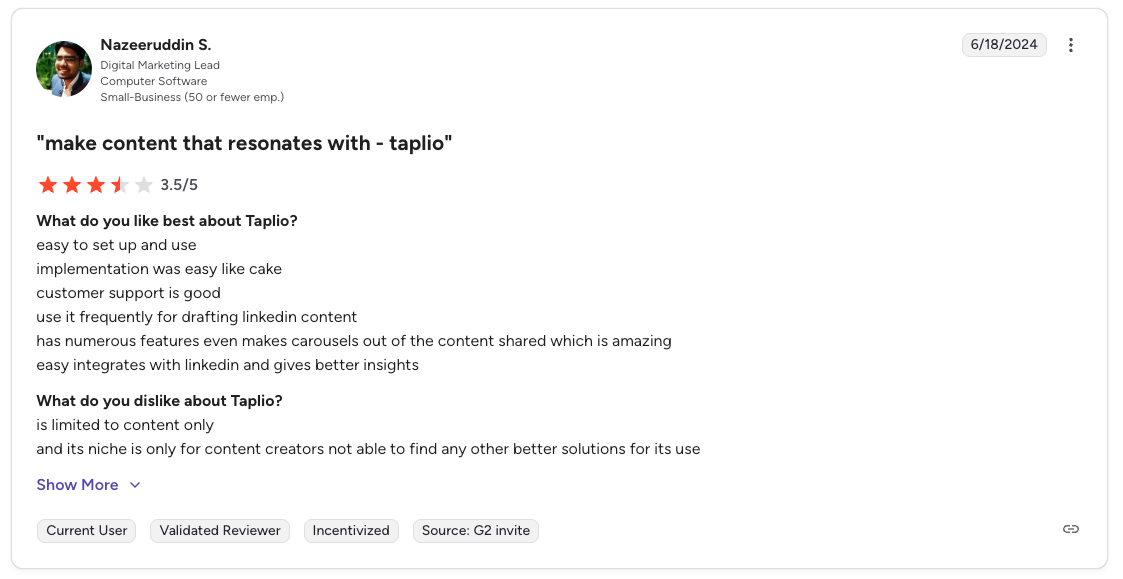
Don't take our word for it, see what users had to say about Taplio on G2 like:
“The best about Taplio is how it streamlines LinkedIn content creation and scehduling with smart automation, making it easy to consistently engage my network without spending hours crafting posts. Easy to use, easy to integrate and easy to implement tool. All you need to do is attach your linkedIn profile and rest Taplio will do. We use it for scheduling future posts. Support is prompt.”
Who Is Taplio Best For?
Not every tool is for everyone. Based on my experience, these are the use cases where Taplio makes the most sense.
Solo founders
If you're building a business and LinkedIn is part of your growth strategy, Taplio gives you a solid system for staying visible without spending hours on content every day. The combination of inspiration, scheduling, and analytics covers the basics well.
SDRs and sales professionals
This is arguably Taplio's sweet spot. With the lead database, auto-DMs, and engagement automation on the Pro plan, it's built for people who see LinkedIn as a sales channel first and a content platform second.
Early-stage creators
If you're just starting to build a LinkedIn presence and your main challenge is consistency and ideation, Taplio's viral library and scheduling tools give you a strong foundation. The AI can help you get drafts out faster while you're still developing your voice.
Who Taplio Is Not Ideal For
Taplio is a strong fit for the right use case, but it has real limitations depending on what you're trying to build. Here are the situations where those limitations tend to show up most.
Creators focused on authentic, voice-driven content
If you've already established your voice and your content strategy depends on sounding distinctly you, Taplio won't elevate your writing. The AI is a generic content engine. It doesn't know your experiences, your stories, your perspective, or your opinions. Every output needs to be manually reworked to sound personal.
This becomes a real friction point over time. When you're spending as much time editing AI output as you would writing from scratch, the tool stops saving you time.
People who want their tool to grow with them
Taplio is largely a static experience. It doesn't learn from your past content, remember what topics you've covered, or build an evolving understanding of your brand. The tool you use in month one is functionally the same tool you use in month twelve. For creators who want a system that gets smarter as they go, this is a fundamental gap.
Teams needing deep collaboration features
While Taplio does offer collaboration on higher plans, user reviews consistently note that the multi-user experience feels clunky. If you're an agency or team managing multiple LinkedIn accounts, the workflow isn't as smooth as you'd want.
Final Take: Should You Choose Taplio or Look Beyond It?
Taplio is a well-built, reliable LinkedIn content creation tool. It's backed by a strong parent company in lempire, the interface is clean, the scheduling features work, and the viral content library is genuinely one of the best in the space.
If your main challenge is consistency and you need a straightforward system for getting LinkedIn posts out the door, Taplio can absolutely help with that. Especially at the Growth tier.
But here's what I'd want you to think about.
The content game on LinkedIn has changed. LinkedIn has over 1 billion members worldwide, making it the largest professional network, with recent estimates placing the total user base closer to 1.2 billion, and around 310 million monthly active users engaging with the platform.
Feeds are flooded with AI-generated posts that all sound the same. The creators who are winning now aren't simply the ones posting the most. Top voices on LinkedIn are authentic and focus on sharing value.
Taplio helps you post but it doesn't help you find your voice. It doesn't learn from your experiences. It doesn't remember what you've written or adapt to how you think.
If you're at the stage where you need a scheduling tool with smart content inspiration, Taplio is a great starting point. If you're at the stage where you need a thinking partner that writes with you and like you, it might be time to look at what Kleo offers instead.
Either way, the best tool is the one that matches how you actually work. Not the one with the longest feature list.
Interested in seeing how Kleo compares head-to-head?
Read the full Taplio vs Kleo comparison.
Frequently Asked Questions
Is Taplio better than other LinkedIn tools?
It depends on what you need. For scheduling and content inspiration, Taplio is one of the strongest options on the market. For AI personalization and voice-driven content creation, other tools like Kleo take a fundamentally different (and deeper) approach.
How much does Taplio cost?
Taplio has three plans: Starter at $39/month, Growth at $69/month, and Pro at $199/month. Annual billing saves you 25%. All plans include a 7-day free trial with Pro-level access.
Can Taplio help me find leads?
Yes, but only on the Pro plan ($199/month). Taplio includes a database of over 3 million contacts with filtering options, plus auto-DM and bulk messaging capabilities. If lead generation is your primary goal, the Pro plan is the only tier that delivers on this.
What is the best alternative to Taplio?
If your main need is scheduling and content inspiration, Taplio is a solid choice but there are a number of Taplio alternatives. If what you really want is a tool that learns your voice, captures your knowledge, and co-creates content that sounds like you, Kleo is built for exactly that.